Services


Industry
Resources
Company


Summarize this blog post with:
Most ERP migration projects don't fail because of bad software. They fail because of poor planning, underestimated data complexity, and teams that weren't prepared for the change. Here's what actually goes wrong and how to fix it before it costs you.
If your business runs on a legacy ERP whether that's SAP R/3, Microsoft Dynamics NAV, Tally, Sage, or an in-house system, you've probably felt the friction. Reports take hours. Your finance team keeps spreadsheets on the side. Integrations are brittle. And every time you want to add a new module, someone says it'll take six months.
Legacy ERP migration to NetSuite is one of the most common decisions growing mid-market companies in India make right now. NetSuite gives you a single cloud platform for finance, inventory, order management, CRM, and more. But the path from your old system to NetSuite is rarely smooth without a clear plan.
At SaasWorx, we work on NetSuite implementations across manufacturing, distribution, technology services, and retail. This blog covers the most common migration challenges we see, and the specific steps that help teams navigate them without going off-track.
On paper, moving to NetSuite looks like a technology upgrade. In practice, it touches every part of how your business runs data structures, workflows, user habits, integrations, and reporting logic built over years.
A 2025 survey by Panorama Consulting found that over 50% of ERP implementations go over budget and over 60% extend beyond their original timeline. The root causes are consistent: data problems, scope creep, and insufficient training.
Here's a closer look at what those challenges actually look like.
Your legacy system has years of data, customer records, vendor masters, open purchase orders, historical transactions. Most of that data was entered by different people across different time periods, often with no validation rules in place.
When you pull that data out and try to map it into NetSuite's structure, gaps show up fast. Duplicate vendors. Customer records with missing GST numbers. Item masters with inconsistent units of measure. Chart of accounts that doesn't align with how NetSuite handles subsidiaries.
Data migration is where most legacy ERP migration projects lose weeks or months. Teams underestimate how much cleanup the source data needs before it can move. This is especially true for companies migrating from Tally to NetSuite, where historical data structures are often loosely defined.
NetSuite has opinionated workflows. Its procure-to-pay, order-to-cash, and financial close processes follow a specific structure. If your current ERP handles things differently and most legacy systems do you have to map your existing process to NetSuite's, or customize NetSuite to match yours.
Neither is straightforward. Customization adds cost and future upgrade risk. Process change requires stakeholder alignment. Both require time you often don't budget for upfront.
Most legacy ERPs sit at the centre of a web of integrations your e-commerce platform, your warehouse management system, your payroll software, your banking feeds. When you replace the ERP, every one of those integrations has to be re-built or re-mapped to NetSuite.
If those integrations aren't documented well (and they usually aren't), your team discovers them mid-migration. That's when timelines slip.
People who've used the same system for five or ten years develop strong habits. NetSuite looks and works differently from most legacy systems. Without adequate training and change management, adoption stalls after go-live. Users revert to workarounds, data quality degrades, and the business doesn't get the value it paid for.
Many teams plan to run their legacy ERP and NetSuite in parallel to validate data. In theory this works. In practice, it doubles the workload on your finance and operations teams during an already stressful period. Errors compound. People burn out. Cutover decisions get delayed because leadership isn't confident the new system is ready.
The good news is that none of these challenges are new. The patterns are predictable, which means you can plan for them.
Run a data audit on your legacy system in parallel with the initial scoping work. Don't wait until the migration team asks for a data extract. The earlier you know how much cleanup your data needs, the more accurately you can estimate the timeline.
Key things to audit:
Ask your IT team or implementation partner to produce a full integration map before the project kicks off. List every system that sends data to or receives data from your ERP, the direction of the flow, the frequency, and the field-level mapping. This document alone can prevent two to three weeks of surprises mid-project. Companies that have gone through migrating from QuickBooks or Zoho to NetSuite often cite integration mapping as the single most underestimated pre-work step.
The finance manager, the warehouse supervisor, the sales coordinator these are the people who will use NetSuite every day. Get them into the process during business process design, not just during training. When users help shape how the system works, adoption after go-live is significantly better.
A note on Indian compliance
If your operations are India-based, NetSuite's India localisation covers GST, TDS, e-invoicing under the IRP portal, and E-way bill generation. Make sure your implementation team has configured these correctly before go-live,. retrofitting tax compliance after launch is painful and costly.
One of the biggest mistakes in ERP modernization is trying to go live with everything at once. A phased approach reduces risk, gives your team time to learn the system, and lets you validate each module before moving to the next.
Here's how a typical phased migration looks for a mid-market company:
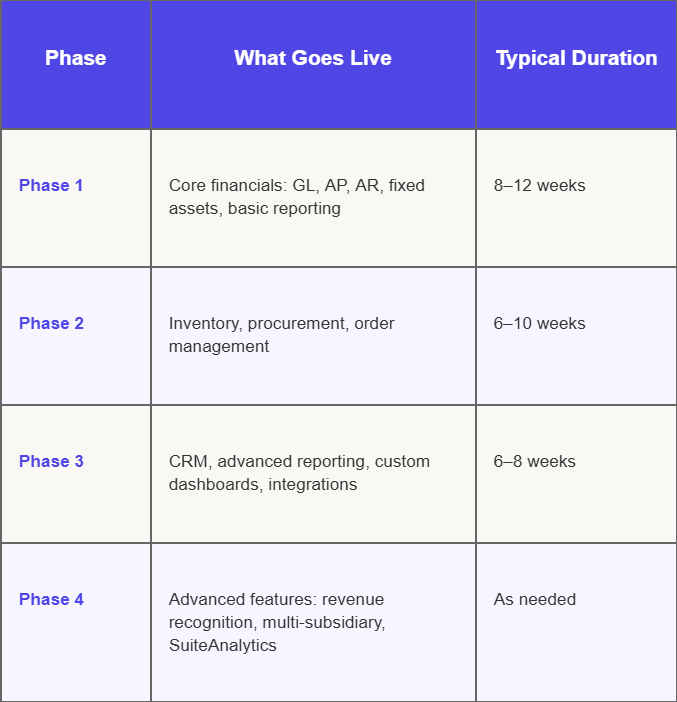
This isn't a rigid formula your phasing depends on where your business pain is sharpest. If inventory chaos is your biggest problem, you might prioritise Phase 2 earlier. For manufacturing businesses, this can directly address issues like stockouts and excess inventory that erode margins when systems aren't unified. The point is to break the project into manageable pieces with real go-live milestones, not one big bang deployment that carries all the risk at once.
A mid-sized auto parts distributor had built their ERP in-house in 2011. By 2024, the system couldn't handle multi-location inventory or GST reporting without manual workarounds. The team was spending 30+ hours a month on reconciliation alone.
The migration approach: a full data audit revealed over 4,000 duplicate item masters. The team spent six weeks cleaning data before any NetSuite configuration began. Integration with their third-party logistics provider was mapped and rebuilt using NetSuite's SuiteFlow. Core financials went live in Phase 1; inventory and order management followed 10 weeks later.
Outcome: Monthly reconciliation time dropped from 30+ hours to under 6. GST filings became automated through the e-invoicing integration. The team was fully operational on NetSuite within 22 weeks of project start.
No implementation partner can save a project where the internal fundamentals aren't in place. Before you begin your legacy ERP migration to NetSuite, make sure you have:
Legacy ERP migration is a significant undertaking. It touches your data, your processes, your integrations, and your people. The companies that do it well are the ones that go in with clear eyes they know the challenges, plan for them specifically, and take a phased approach instead of trying to solve everything at once.
ERP modernization with NetSuite gives you a platform built for the way mid-market businesses operate today: cloud-native, real-time, and scalable. But you get there through careful execution, not just a software purchase.
If you're in the early stages of evaluating a move from your legacy ERP, start with a data audit and an integration map. Both will tell you more about your actual migration complexity than any vendor demo will.