Services



Industry
Resources
Company
.png)


Summarize this blog post with:
• NetSuite Multi-Book Accounting keeps several sets of books from one set of real-time transactions. A US parent can report in US GAAP while its Indian subsidiary reports in Ind AS, with no re-keying.
• It is available only in NetSuite OneWorld. Full Multi-Book needs a separate licence and implementation by NetSuite Professional Services or an authorised partner.
• Adjustment-only books are a lighter option. They do not copy primary-book data; you post only the differences. Any OneWorld admin can enable them.
• Secondary books can use a different base currency, different accounts and different rules for revenue recognition, amortisation and fixed asset depreciation.
• The largest US GAAP vs Ind AS gaps sit in leases, credit losses, development costs, fixed assets and impairment reversals.
• Ind AS applies to Indian companies with net worth of ₹250 crore or more, listed companies (other than SME-listed) and their group companies. Smaller subsidiaries often still report under Indian GAAP.
If your group has an Indian subsidiary, you already know the routine. Head office wants US GAAP numbers for consolidation. The Indian auditors want Ind AS financials for the statutory filing. Someone on the finance team spends the last week of every quarter rebuilding the trial balance in a spreadsheet, and nobody fully trusts the bridge between the two.
NetSuite multi-book accounting removes most of that work. This guide explains how it handles dual GAAP and Ind AS reporting, where the two frameworks really differ, which book type fits your situation and how to roll it out without disrupting the close. It reflects Oracle NetSuite documentation, the current Ind AS rules and what our NetSuite implementation team in India sees across multi-country rollouts.
Multi-book accounting in NetSuite lets you maintain more than one set of accounting records from a single set of transactions. You post an invoice, bill or journal once. NetSuite records it in the primary book (for example, US GAAP) and in each secondary book (for example, Ind AS), applying that book’s own accounts, currency and rules.
Per the NetSuite Multi-Book Accounting overview, the system keeps parallel transactions in sync across books to protect data integrity. A secondary book can differ from the primary book in three ways:
• Base currency: The Indian book can run in INR even if group reporting runs in USD.
• Accounts: Chart of accounts mapping sends the same transaction to different accounts in each book.
• Rules: Revenue recognition, expense amortisation and fixed asset depreciation can follow different schedules per book.
You can also post book-specific journal entries, including intercompany journals, and filter the GL Impact page by accounting book. That last point matters to auditors, because they can trace every Ind AS balance back to its source transaction.
Dual reporting pressure comes from two directions in Indian groups:
1. Foreign parent, Indian subsidiary: A US-headquartered SaaS company or global capability centre (GCC) consolidates in US GAAP. Its Indian entity must file Ind AS or Indian GAAP statements under the Companies Act, 2013.
2. Indian parent, foreign subsidiaries: An Ind AS company with US, Singapore or UAE subsidiaries lets those entities keep local books, but they must report Ind AS-adjusted figures to the parent for consolidation.
Either way, the spreadsheet bridge creates the same problems. Adjustments live outside the ledger, so they lack an audit trail. Opening balances drift each year. A late journal in the primary book never reaches the statutory version. And the bridge depends on one or two people who understand it.
Fiscal year adds another layer. Indian companies follow an April to March financial year under the Companies Act. A subsidiary of a foreign company can apply to the National Company Law Tribunal for a different year that matches its parent, but many groups still need April to March statutory numbers. If your group also runs several entities, our guide to multi-entity financial consolidation covers the wider set-up.
Ind AS rolled out in phases under the Companies (Indian Accounting Standards) Rules, 2015. Based on the ICAI applicability material, it applies to:
• Companies with net worth of ₹500 crore or more (Phase I, from April 1, 2016).
• Companies listed or in the process of listing in or outside India, other than on SME exchanges, and unlisted companies with net worth of ₹250 crore to ₹500 crore (Phase II, from April 1, 2017).
• Banks, NBFCs and insurers under separate, phased timelines.
• The holding, subsidiary, joint venture and associate companies of any company above.
Once a company adopts Ind AS, it cannot switch back. Smaller Indian subsidiaries that do not meet these tests usually report under Indian GAAP (the Accounting Standards). Multi-book works the same way for them: the secondary book simply follows Indian GAAP rules instead.
What changed recently. Ind AS keeps moving with IFRS. The Ind AS 21 amendment on lack of exchangeability, notified on May 7, 2025, applies from April 1, 2025. Further amendments to Ind AS 109, Ind AS 107, Ind AS 101, Ind AS 110 and Ind AS 7 apply to annual periods beginning on or after April 1, 2026. Each change is a reason to keep statutory logic inside the ledger, where you update it once.
Ind AS is closely aligned with IFRS, so most US GAAP vs Ind AS gaps mirror the US GAAP vs IFRS gaps. These are the ones that most often create entries in a secondary book:
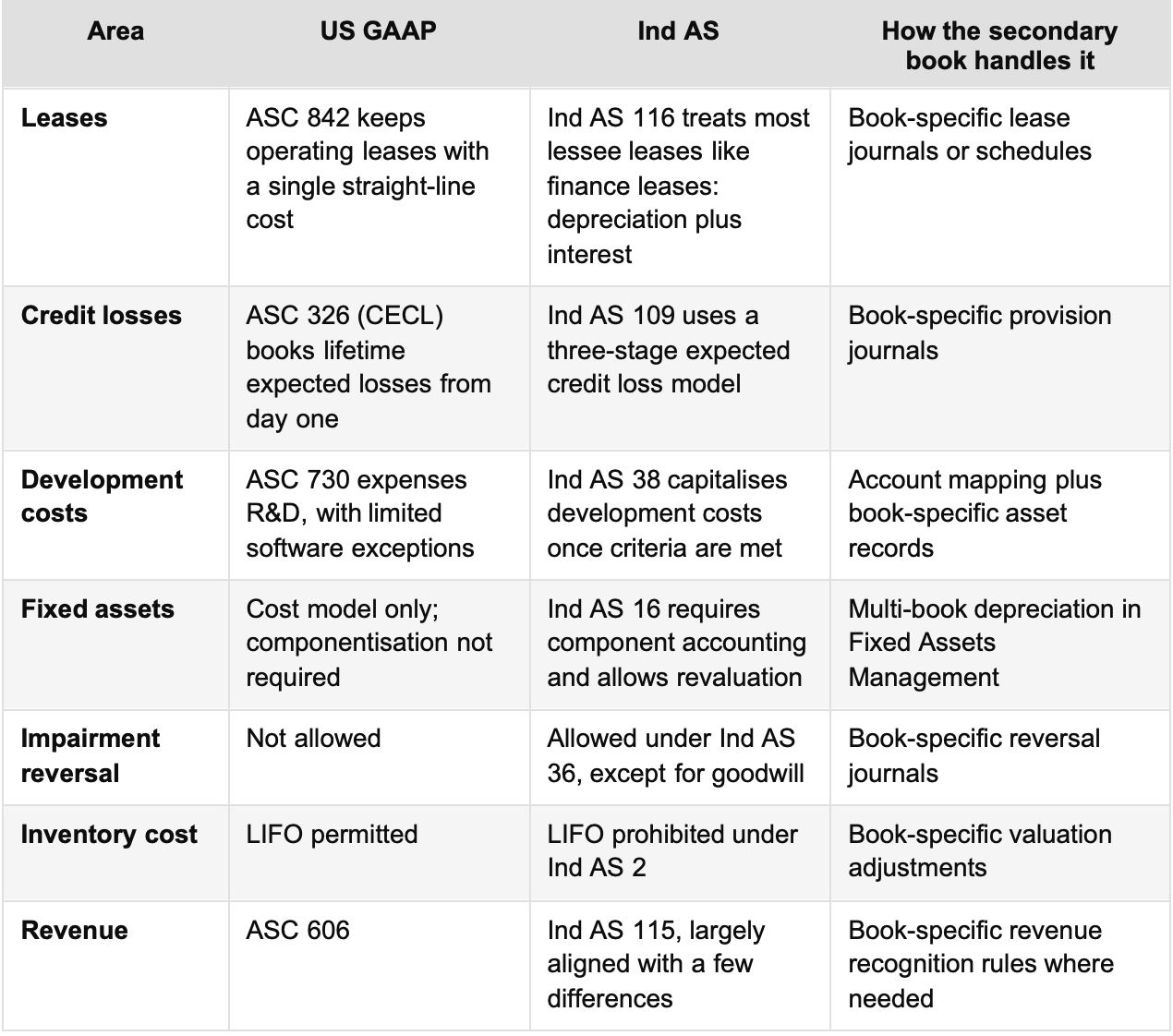
For revenue in particular, see our deep dives on Ind AS 115 revenue recognition in NetSuite and ASC 606 for Indian SaaS companies.
NetSuite gives you two ways to run a statutory book. The right choice depends on how many differences you have and how often they occur.
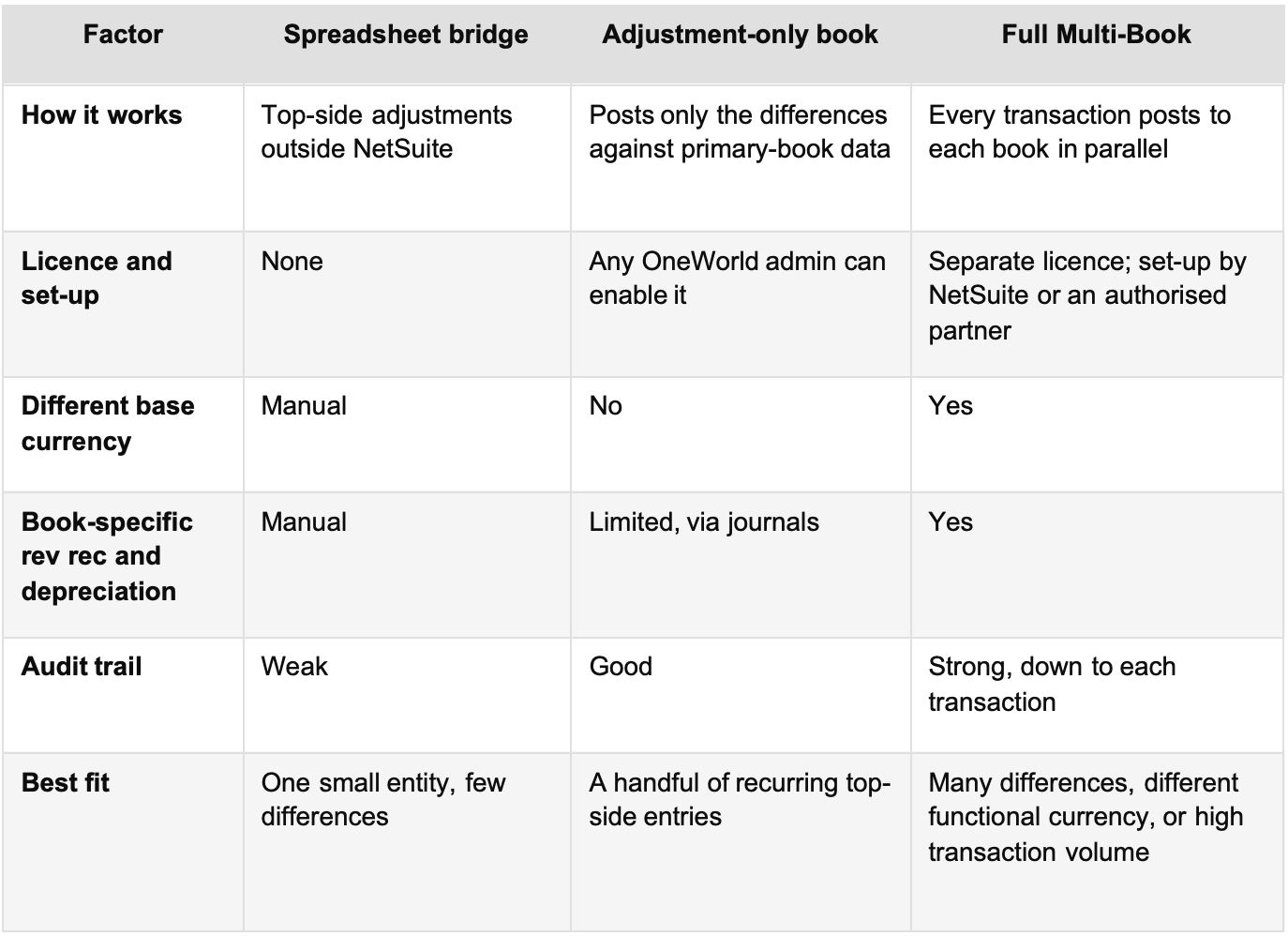
A practical rule: if your Ind AS book needs a different base currency, or you expect different revenue or depreciation schedules, go with full Multi-Book. If the gap is a few lease and provision entries each quarter, an adjustment-only book is often enough. Practitioners also warn that adding full Multi-Book to a live account is the hardest path, because historical transactions, revenue arrangements and depreciation schedules may need reprocessing.
List every recurring difference between your primary and statutory frameworks, with the standard, the accounts affected and how often it occurs. Your statutory auditor should review this list before any configuration starts.
Use the register to decide between an adjustment-only book and full Multi-Book. Confirm the base currency for each secondary book and which subsidiaries it covers.
Map only the accounts that truly differ. Over-mapping makes reconciliation harder. Align the Ind AS account structure with Schedule III presentation so the statutory statements build cleanly.
• Revenue recognition and expense amortisation rules for each book.
• Fixed asset depreciation methods and useful lives through the Fixed Assets Management multi-book add-on.
• Exchange rate settings, including book-specific consolidated rates where needed. Our post on forex auto-posting in NetSuite covers the currency side.
Load audited Ind AS opening balances, then run at least one full period in a sandbox. Reconcile each book’s trial balance against the difference register before go-live.
NetSuite lets you close and reopen periods by accounting book. Close the primary book first, post statutory adjustments, then close the Ind AS book. By default, consolidation runs only in the primary book. To consolidate a secondary book, tick Enable Consolidation on that book record, as described in Using Multi-Book Accounting.
• Choosing full Multi-Book by default. If an adjustment-only book covers your differences, it is cheaper to run.
• Adding books after go-live without a plan. Retrofitting means reprocessing history. Decide at implementation where you can.
• Mapping too many accounts. Every mapped account is one more reconciliation.
• Leaving intercompany out of scope. Intercompany journals must eliminate in every consolidated book. See our guide to intercompany accounting in NetSuite.
• Skipping auditor sign-off. Agree the difference register with your auditor before you configure anything.
Yes. NetSuite does not ship a fixed “Ind AS mode”. Instead, you configure a secondary accounting book with Ind AS accounts, rules and currency. Multi-Book Accounting, including adjustment-only books, requires NetSuite OneWorld.
The primary book holds your main reporting basis, often US GAAP or IFRS. Secondary books record the same transactions under another basis, such as Ind AS or a tax view. Consolidation runs in the primary book by default, and you can enable it for a secondary book.
It can be, when the differences are few and the base currency is the same. Adjustment-only books post only the differences and do not need the full Multi-Book licence. If you need a different base currency or book-specific revenue and depreciation schedules, use full Multi-Book.
Yes, but plan for the effort. Adding a full secondary book to a live account may require processing historical transactions and rebuilding revenue and depreciation schedules. NetSuite Professional Services or an authorised partner must implement full Multi-Book.
Only if they meet the Ind AS tests themselves, such as net worth of ₹250 crore or more, or a listing. Otherwise they usually report under Indian GAAP. A foreign parent’s framework does not trigger Ind AS on its own.
Dual GAAP and Ind AS reporting does not need a parallel spreadsheet world. With the right book type, focused account mapping and a disciplined close, NetSuite gives you group and statutory numbers from the same transactions, with a full audit trail. The hard part is the design: knowing your real differences and deciding early.
SaasWorx implements NetSuite OneWorld for multi-country groups across India, the US, the UAE and Singapore, including Multi-Book set-ups for statutory reporting. If you are weighing an Ind AS book or reviewing an existing one through a NetSuite optimisation audit, you can talk to a NetSuite specialist to map your options.