ERP Selection Checklist: 10 Critical Questions to Ask Vendors Before Signing a Contract
.png)


Let’s Work Together
Summarize this blog post with:

Quick Summary
• An ERP contract locks you in for years. The questions you ask before you sign matter more than the demo.
• They cover cost, renewal caps, fit, the delivery team, data exit, integrations, AI pricing, SLAs, security and the roadmap.
• In Panorama’s 2026 ERP Report, more than a quarter of firms went over budget. The top cause was extra tech needed after the project began.
• Get every answer in writing. Attach the key ones to the contract.
An ERP contract shapes how your finance and operations teams work for years, and switching later is slow and costly. Yet many buyers sign after a slick demo and a price sheet.
This ERP selection checklist gives you 10 questions to ask vendors before the contract goes to legal, with what a good answer sounds like and the red flags to watch for.
What is an ERP selection checklist?
An ERP selection checklist is a set of questions you use to compare ERP vendors before you buy. A good one goes beyond features. It tests five-year cost, renewal terms, data ownership, integration limits, AI pricing, service levels, security, the delivery team and the roadmap.
Why Vendor Questions Matter More in 2026
ERP projects still let buyers down too often. Gartner research predicts that by 2027, more than 70% of recently implemented ERP initiatives will fail to fully meet their original business case goals.
Many of these problems start at selection. Panorama Consulting Group’s 2026 ERP Report, released in March 2026, found that more than a quarter of firms went over budget. The main cause was the need for extra technology. Buyers found gaps after signing that they should have found before.
Three shifts raise the stakes this year:
• Old systems are hitting deadlines: SAP’s mainstream maintenance for SAP ERP 6.0 (ECC) ends in 2027, with paid extended maintenance through 2030.
• AI is changing ERP pricing: Vendors now build AI assistants and agents into ERP. Some come with the plan. Others cost extra or are billed by usage.
• Privacy rules are getting stricter: In India, the Digital Personal Data Protection Rules, 2025 were notified in November 2025. Most core duties apply from May 2027, and your ERP will hold plenty of personal data.
The ERP Selection Checklist: 10 Questions to Ask Vendors
1. What will we pay over five years, all in?
The licence fee is rarely the biggest number. Ask for a five-year total cost of ownership (TCO) that covers:
• Subscription fees by user type and module
• Setup, data migration and training
• Integrations and connector fees
• Test environments, extra storage and premium support
• Your own staff time during and after go-live
Good answer: A line-by-line estimate with clear assumptions, such as user counts per year.
Red flag: “We’ll scope that later” for anything that affects cost.
2. How much can our price rise at renewal, and is that cap in the contract?
Your first-term price is often the best you will get. Ask about:
• A written cap on yearly price increases
• Price protection for users and modules added mid-term
• Minimum commitments, and whether you can cut users at renewal
• Notice periods for renewal
Good answer: Exact numbers in the order form, not in a sales email.
Red flag: Discounts that end after the first term with no renewal price stated.
3. Can you show our processes working with our data?
A scripted demo tells you little. Give each vendor three to five of your real cases, such as a multi-currency intercompany invoice, to run live. Then ask for a written fit-gap list marking each need as standard, configuration or custom build.
This is how you catch the gaps behind Panorama’s overrun data. For more prompts, see our 20 critical questions to ask during ERP evaluation.
Good answer: A live run of your case and a fit-gap document you can attach to the contract.
Red flag: “That’s on the roadmap” for a must-have need.
4. Who will implement it, and can we meet the team?
The software and the people who set it up are separate choices, and the second often decides the outcome. Ask:
• Is the partner certified on this product, and how many projects have they done in our industry?
• Will we get named consultants, and can we interview the project lead?
• Is the work fixed-fee, time and materials, or a mix?
Call two references from firms like yours. Our guide to common ERP implementation challenges shows why scope creep and weak change management sink so many projects.
Good answer: Named people, relevant customer success stories and a clear delivery method.
Red flag: A senior sales-cycle team that vanishes once you sign.
5. Who owns our data, and how do we get it out if we leave?
Before you sign, confirm:
• You can export all data, including history, files and audit trails
• The export format and any fees
• How long your data stays available after the contract ends
• The vendor will certify deletion on request
Exit terms feel distant on day one but matter in year five. Our NetSuite data migration checklist shows how much work clean, portable data takes.
Good answer: Exit and handover clauses in the master agreement.
Red flag: Data export only through paid services.
6. How does it connect to the systems we already use?
ERP must share data with your CRM, payroll, bank, tax and BI tools. Ask:
• Which ready-made connectors exist for our current tools?
• What API limits apply, and do they change by licence tier?
• Who builds and maintains each integration, and who fixes it after an upgrade?
If you run Salesforce, our guide to integrating NetSuite ERP with Salesforce shows what a well-built order-to-cash link looks like.
Good answer: A written integration plan with named tools and owners.
Red flag: Talk of an “open API” with no published limits.
7. Which AI features are included, and how are they priced?
Most major ERP vendors now offer AI assistants and agents, on very different terms. Ask:
• Which AI features come with our plan, and how are the rest priced: per user, per transaction or by usage credits?
• Is our data used to train shared models, and can we opt out?
• Can we require human approval before AI posts entries or releases payments?
Ask for a live example, not a slide. Our article on practical ways AI reduces manual accounting work shows where AI in ERP pays off today.
Good answer: A clear list of included features, a price schedule and written data-use terms.
Red flag: “AI is included” with no detail on what that means.
8. What service levels do you commit to, and what happens if you miss them?
Your ERP runs invoicing and month-end close, so downtime costs money. Pin down:
• The monthly uptime target
• Support response times by severity
• Support hours that cover your time zones, such as India, the US or the Middle East
• Service credits when targets are missed
Good answer: A published SLA with service credits and a named escalation path.
Red flag: “Best efforts” wording with no measurable targets.
9. How do you protect our data and keep us compliant?
Ask for proof, not promises:
• Audit reports such as SOC 1 and SOC 2 Type II, and ISO/IEC 27001 certification
• Where your data is hosted, and whether you can pick the region
• How fast the vendor will tell you about a breach
• Support for local rules, such as GST e-invoicing in India
Under India’s DPDP framework, you stay responsible for personal data your vendors handle, so the contract should spell out their security and breach-reporting duties. Our article on NetSuite governance, risk and compliance explains how audit readiness works in practice.
Good answer: Current audit reports shared under NDA and a data processing agreement ready to sign.
Red flag: No audit reports until after you buy.
10. What does your roadmap look like, and how will upgrades affect us?
You are buying a platform for the next five to ten years. Ask:
• How often do you release updates, and are they mandatory? NetSuite, for example, ships two major releases a year.
• Will our settings and custom scripts survive upgrades?
• How much notice do you give before you retire a feature?
• When does support end for the version we are buying?
SAP ECC users face this now, with mainstream maintenance ending in 2027 and extended maintenance running through 2030.
Good answer: A release calendar, a sandbox to test updates and written notice periods.
Red flag: Heavy custom work the vendor admits may break on upgrade.
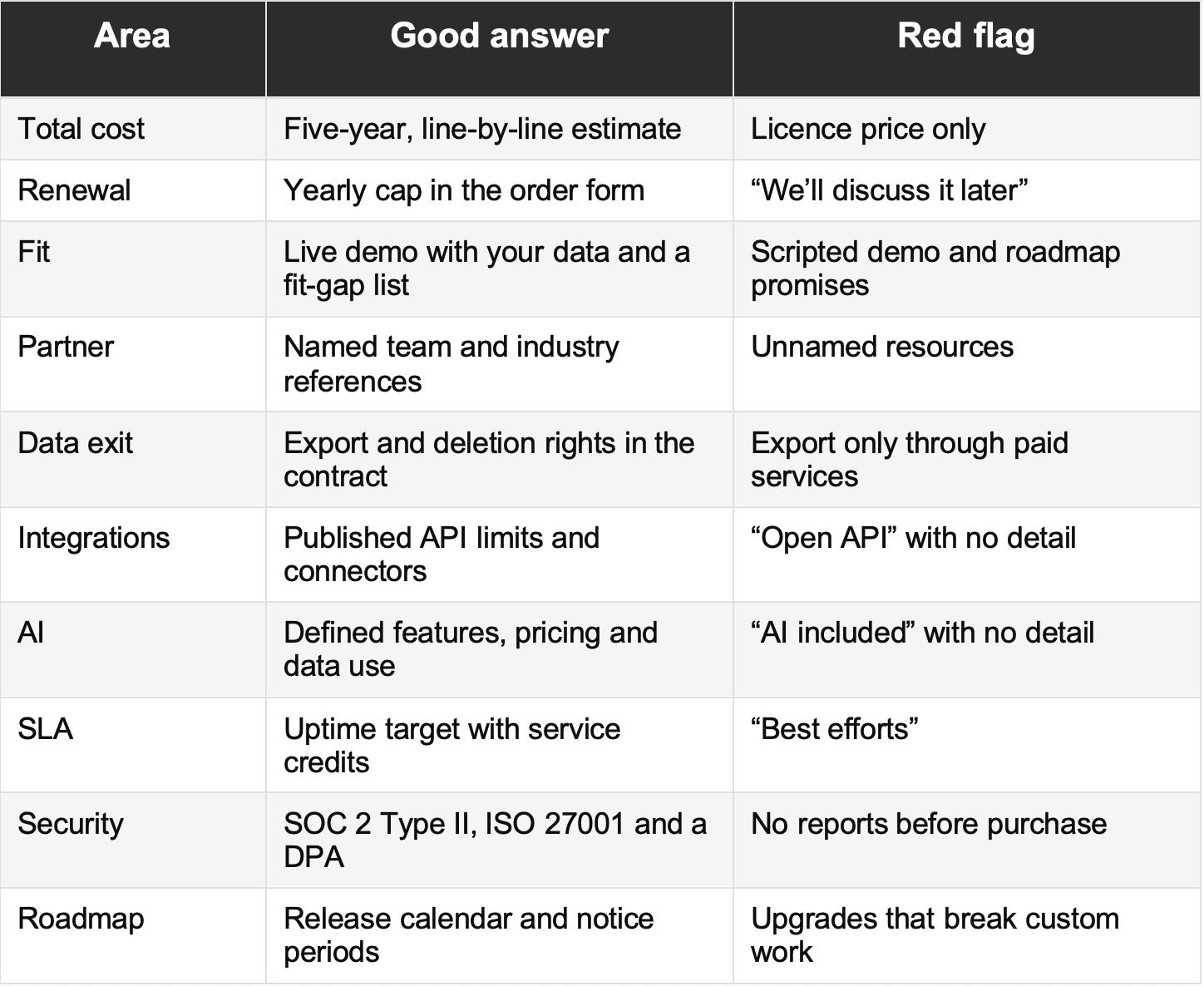
Good vs Weak Vendor Answers at a Glance
How One Question Changes the Decision
Here is a composite of a pattern we see often. A software firm with entities in India and the US shortlists two vendors with strong demos. The team asks question 3 and requests a live run of its own case: a multi-year subscription with a mid-term upgrade, billed in two currencies, with revenue recognised under ASC 606 and Ind AS 115.
One vendor handles it with standard settings. The other needs a third-party billing tool and custom scripts. That vendor had the lower licence quote, but its five-year cost is higher once the add-ons are counted. One question changed the decision.
How to Use This Checklist
1. Define your needs and shortlist about three vendors. Our 10-step ERP evaluation process and comparisons such as NetSuite vs SAP Business One and NetSuite vs Microsoft Dynamics 365 help here.
2. Send the 10 questions in writing with your RFP.
3. Score answers on a weighted scorecard agreed by finance, IT and operations.
4. Check claims through scripted demos and your own reference calls.
5. Attach the key answers to the contract as schedules.
6. Have legal and finance review renewal, exit, SLA and data terms.
Frequently Asked Questions
How many ERP vendors should you shortlist?
Three works well for most mid-sized firms. It gives a real comparison without spreading your team too thin.
What contract terms matter most in a cloud ERP agreement?
Renewal price caps, data exit rights, SLAs with service credits, the data processing agreement and a clear scope of work.
Should you negotiate with the ERP vendor or the implementation partner?
Both, separately. Agree pricing and data terms with the vendor. Agree scope, team and change rates with the partner.
What is the biggest mistake when choosing an ERP?
Buying on demo polish and licence price instead of proven fit and total cost. A proper fit-gap review prevents many of the overruns Panorama tracks.
Conclusion: Ask Now, Not After Go-Live
A good ERP vendor will welcome these questions. Vague replies, or pressure to sign before quarter-end, tell you something too.
Add your industry’s must-haves, weight what matters most, and keep every answer on file.
If Oracle NetSuite is on your shortlist, or your current system no longer fits, the SaasWorx team has delivered more than 110 NetSuite implementations across IT services, SaaS, manufacturing and professional services.
%20(1).png)
.png)